


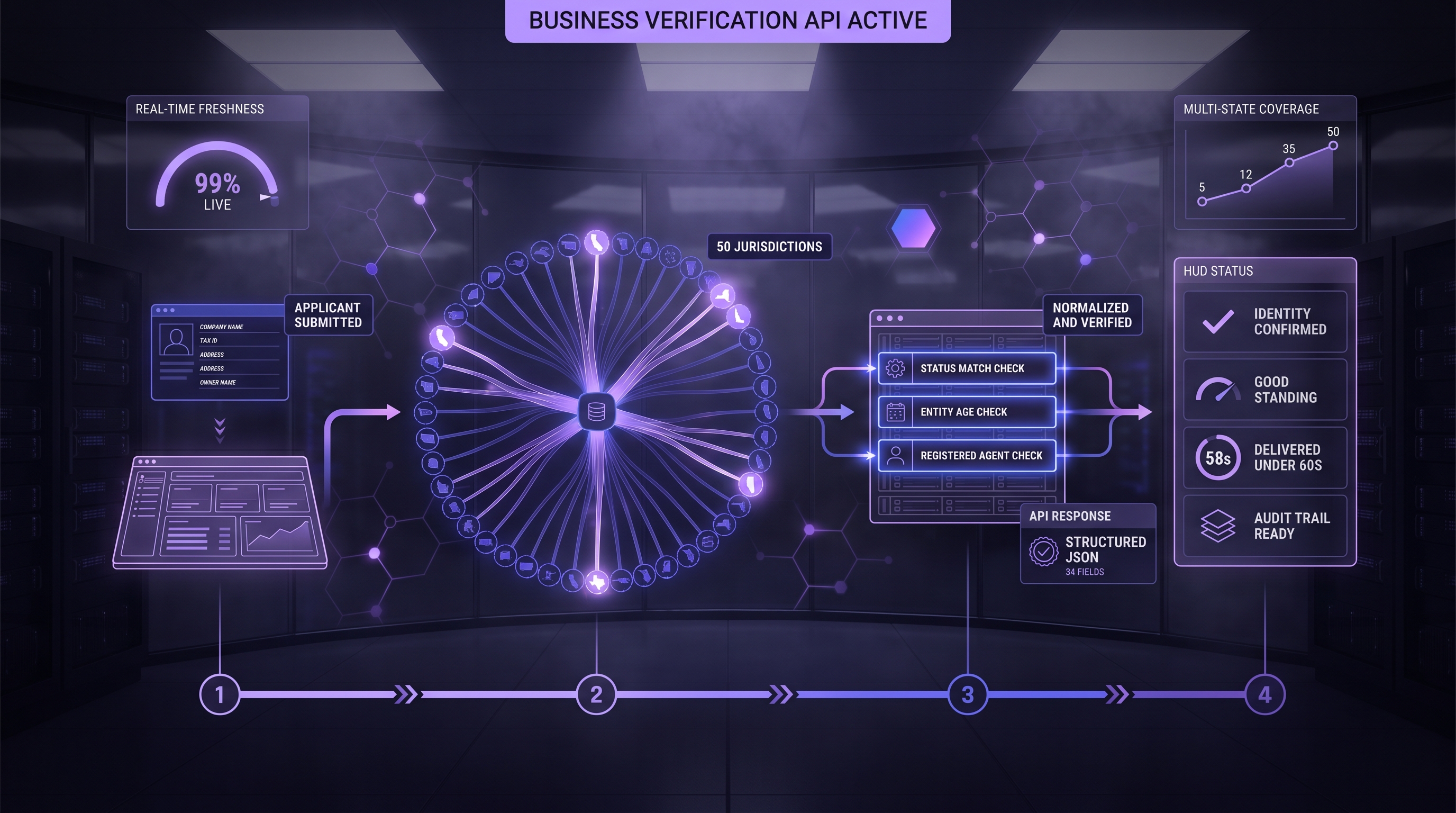
Executive Summary: This page answers the 34 questions buyers ask most often about the Cobalt Intelligence Secretary of State API and the business verification products built around it. The answers are grouped by situation, so a risk lead, an operations lead, or an engineer can read the section that matches their workflow. Each answer states what the API returns, where the state decides, what the documented limit is, and what your team still decides for itself. Pricing and contract terms are not covered here; they belong in a demo conversation. Product statements link to Cobalt's public API documentation, help center, or published posts, and figures from Cobalt's own September 2026 coverage measurement are labeled as such.
The eight situations, with the questions each one covers:
• What the API returns and how current it is. Questions 1 to 5: live versus cached data, documents, screenshots, cache age, and fields by state.
• Matching the right business. Questions 6 to 10: mismatches, the confidence value, punctuation and suffixes, entity-number search, and typeahead selection.
• Speed and long-running searches. Questions 11 to 13: measured response times, retryId and callbackUrl, and state outages.
• Fraud checks, monitoring, and audit evidence. Questions 14 to 17: fraud signals, additions since 2024, change monitoring, and related entities.
• The rest of the suite. Questions 18 to 26: TIN/EIN verification, UCC filings, court records, sanctions screening, and contractor licenses.
• Foreign entities, every-state search, and Puerto Rico. Questions 27 to 29.
• Integration and support. Questions 30 to 32: the integration pattern, test mode, and using the data in your own product.
• Product fit and evaluation. Questions 33 and 34: how to evaluate before committing, and which product fits which situation.
What Does a Secretary of State API Return, and How Current Is It?
The first thing most buyers want to know is whether the data is the state's record or someone's copy of it, and what actually comes back. These five questions cover the source, the evidence artifacts, and the fields.
1. What makes a live Secretary of State API lookup different from a database lookup?
A live lookup queries the state's own registry site at the moment you ask and returns what that registry shows right then. Results are live by default; you opt into the cache with the liveData parameter when you prefer speed and broad coverage over the very latest changes, and live lookups are also what make a timestamped screenshot possible.[1][2]
Both response types carry the same business fields, so you tell them apart by two signals. When a live request cannot finish, or the state site is down for maintenance, and recent cached data exists, the API reference adds an optional top-level message saying that recent results were returned instead and omits the field otherwise; same note as a messages array, but the top-level message is the field the reference documents and the one Cobalt's September 2026 measurement received from Nevada.[2][3]
The second signal is age: the API reference says createdAt and updatedAt appear when liveData is false, and suggests them for judging recency.[2][3]
The practical difference is timing: a filing appears in a live result as soon as the state publishes it, while a cached copy waits for its next refresh, and refresh cadence varies by state.[4] Use the live lookup for the decision of record and the cached read for pre-screening and repeat checks. The real-time versus cached registry data guide walks through what goes stale and when.
2. Does the API return historical filings and documents?
Cobalt mirrors what each registry publishes, no more and no less, and it does not include entity status that a state sells as a separate paid request, as Delaware does (question 14).
Screenshots are available from every state, and filing documents come back when a state publishes them; at about 18 states, and the public feature-support spreadsheet it links marks a documents field for 23 jurisdictions, so check your states against the spreadsheet rather than the round number.[5][6]
Where a state does publish filings, Cobalt returns them and analyzes the document text to flag officer, address, and merger changes, and some states expose a filing history that comes back in the documents or history fields.[7][8]
Where a state does not publish documents, the API cannot supply them. Delaware is the documented example: its online status service lists an entity's status and last five filings, but officer and director names sit on annual-report images the service does not provide, and the public feature-support spreadsheet does not mark a documents field for Delaware.[9][6]
Cobalt is also not your archive. The documented account endpoint reports usage against your API key, not your past results, so store each response, screenshot, and source URL in your own system of record at the moment of the decision.[10] The audit-proofing guide covers what to retain.
3. Can I get a screenshot or the source page as evidence?
Yes. Setting screenshot=true returns a timestamped capture of the state page alongside the structured data, showing the timestamp and source URL with no Cobalt watermark.[11][2]
The result object also documents a url field, but the public feature-support spreadsheet marks it for only 19 of 52 jurisdictions against 52 for screenshotUrl, so rely on the screenshot to carry the source address.[2][6]
The API reference describes the screenshot as a short-lived URL, and document links are valid for three days by default and can be extended up to 30 days on request, so download the file and attach it to the loan file rather than storing the link.[2][12]
Two absence cases matter for your evidence model: live lookups are what enable the screenshot, so a cached read does not carry one, and neither does an interim cached record returned while a live search is still running, which the cachedData evidence guide explains.[1]
The public feature-support spreadsheet currently marks the screenshot field for every jurisdiction including Puerto Rico, while the API reference says screenshots are not yet available in all states and notes that access limits can exempt a state, so re-check the spreadsheet when you add a state.[6][13]
Regulators often accept a timestamped, sourced screenshot in place of an official filing and that higher-risk or post-audit cases may require the full filing; which regulator and which rule apply to your file is a question for your compliance team.[14]
4. How current is cached data, and when should I use it?
Cached records do not auto-expire. Each payload includes createdAt and updatedAt so you can apply your own age policy rather than inherit one, and the API reference ties those fields to cached responses, where liveData is false.[15][2]
The public feature-support spreadsheet marks them for 26 of 52 jurisdictions, so treat a record without a timestamp as one of unknown age, not a fresh one.[6] Refresh cadence varies by state: many sources refresh about monthly, some quarterly, and a few on request, and any successful live call also updates the cache.[4]
New York, Florida, Texas, and Illinois among the high-demand states refreshed monthly and New Jersey as a limited-access state that updates less often.[16] The cache holds tens of millions of records, roughly 70 to 80 percent of US businesses by Cobalt's description, which suits throughput and latency but not an entity formed last month.[17]
A cache miss means only that the entity is not in the cache, not that it does not exist at the state.[18] Since September 2026, an incomplete live response can also carry interim cachedData with an updatedAt value while the live search continues; it can move reversible work forward, but it is optional, it can differ from the completed live match, and it never replaces the final live result.[19] Read the cached data during long-running searches guide before you design around it, and use the verification waterfall guide to decide which mode runs first.
5. Which fields come back, and do all states return the same fields?
The documented result object carries the legal name as title, the raw and normalized status, the filing date and its normalized form, the entity type, the state of formation and the state of registration, the sosId, the registered agent name and address, the physical, mailing, and state addresses, a url, the screenshotUrl, an inactive date where the state records one, and confidenceLevel, plus a possibleAlternatives list of close matches.[2][20] Field names are consistent across states; field presence is not.
Cobalt measured this on September 11, 2026 by searching three large national companies by name in the 50 state registries and the District of Columbia, 153 probes in all, and counting a field only when it came back populated; 113 probes returned a record, and three probes per state show what a state can return, not what it never returns.
Eight fields came back from every one of the 51 registries: title, status, normalizedStatus, filingDate, normalizedFilingDate, sosId, stateOfSosRegistration, and confidenceLevel. That is presence at least once per registry, not on every record: one Arizona record came back with neither filing date. The registered agent name came back from 49, the agent street address from 46, the physical street address from 42, the state of formation from 37, officers from 32, and the next report due date from 23.
That measurement is Cobalt's own; the public reference is the feature-support spreadsheet the help center links, which marks each field by jurisdiction (officers for 35, for example) and answers a slightly different question than a three-probe run, so plan against the spreadsheet and test against your own names.[6] Treat every field as optional in your data model, the eight included, and branch on whether each one is present. The developer field reference and the coverage-by-state checklist show how to plan for the variation. An illustrative response, using the documented field names, looks like this:
{
  "status": "Complete",
  "statusCode": 200,
  "nameAvailable": false,
  "results": [
    {
      "title": "EXAMPLE HOLDINGS LLC",
      "status": "Active",
      "normalizedStatus": "Active",
      "filingDate": "03/15/2019",
      "normalizedFilingDate": "2019-03-15",
      "entityType": "Domestic LLC",
      "stateOfFormation": "Arizona",
      "stateOfSosRegistration": "Arizona",
      "sosId": "EXAMPLE-0000001",
      "agentName": "EXAMPLE REGISTERED AGENTS INC",
      "agentStreetAddress": "100 EXAMPLE WAY",
      "agentCity": "PHOENIX",
      "agentState": "AZ",
      "agentZip": "85001",
      "physicalAddressStreet": "200 SAMPLE AVE",
      "physicalAddressCity": "PHOENIX",
      "physicalAddressState": "AZ",
      "physicalAddressZip": "85001",
      "officers": [{"name": "J. EXAMPLE", "title": "Manager"}],
      "url": "the state record URL",
      "screenshotUrl": "the timestamped screenshot URL",
      "confidenceLevel": 1
    }
  ],
  "possibleAlternatives": []
}
How Does the API Match the Right Business?
Name matching is where most verification failures start, because each state runs its own search engine with its own rules. These five questions cover mismatches, the confidence value, near matches, entity-number search, and typeahead selection before the search.
6. What happens when the submitted name does not match the state record exactly?
The API sends your query to the state's search and returns the best match, the string that triggered it, and a list of close candidates. The response includes the legal business name, any assumed or DBA names where present, and a "Search Input Hit" field that shows which string produced the match; the API reference's result object lists no field by that name, so confirm it in a live response before a reviewer relies on it.[21][2]
When no exact match exists, the documented no-exact-match response says so in its message and carries an alternativeResults list with each candidate's name, status, entity ID, and registry URL; a completed result carries the same kind of list as possibleAlternatives, so read whichever list the response shape you received includes.[22][2]
A message that says no business was found in the database is a statement about the cache and that spelling, and the message itself tells you to retry with live data before treating it as a miss.[22] The API reference describes the street, city, and zip parameters as an AND search over the top ten results, checking the physical address first, then the mailing address, then the agent address.[2][23] The public feature-support spreadsheet marks address search for every jurisdiction except Delaware, DC, and Puerto Rico.[6] The application-data mismatch guide and the alternative matches review guide show how to route each outcome.
7. What is the confidence score and how should I use it?
Every result carries confidenceLevel, a value from 0 to 1 that measures how closely the returned name matches what you sent, and the string similarity between the submitted and returned names, with 1.0 roughly an exact match after entity suffixes such as LLC are normalized.[2][24]
The documented result also carries an aiConfidenceLevel, which the help center calls a beta signal for internal testing, not for production logic.[25] Cobalt's threshold guidance treats 0.80 and above as auto-accept, 0.60 to 0.79 as review, and below 0.60 as usually reject unless other signals, such as an address match, are strong.[26]
Two documented details change how you read the number. In states that merge a DBA with the legal entity, a DBA search can score 1.0 while the details page shows a different legal name, and the documented searchResultTitle field appears when the search-results name differs from the details page; each close match in the alternatives list also carries an addressMatch flag you can use to break ties.[27][2][28]
Those bands are guidance, not policy. Your team sets the thresholds, decides what human review looks like, and records the rule version that applied to each file. The confidence scoring explainer and the decisioning guide cover threshold design.
8. How does the API handle punctuation, suffixes, and near matches?
Cobalt leans on each state's search, which means the state's quirks are part of the result. Each registry's search has its own rules: New York can be tighter about pluralization and spacing, and Texas runs separate search surfaces at the Secretary of State and the Comptroller.[29][30][31]
The API compensates with the confidence value, the possibleAlternatives list of close matches when the exact match is uncertain, and the documented no-exact-match message that points you to the alternatives.[20][22]
Before searching, Cobalt also strips formatting noise such as invisible characters from the query, and when an initial search returns nothing and abbreviations seem to be involved, it may run a second pass that expands them.[32]
Two input rules are documented as well: a business-name query must be at least three characters, and a person-name query at least two, or the request is rejected as a bad request.[22]
Send the full legal name including the suffix, review alternatives before declaring a no-match, and keep the entity number on file so the next lookup can try the ID first in states where ID search works for you.
9. When should I search by entity number instead of name?
Whenever you have it, once you have confirmed how your states handle it. Every state assigns an entity number, called a file number, charter number, or document number depending on the state. The API reference documents sosId as a search input alongside the business name, and a request that carries the state and the registration ID is scoped to that specific record only.[2][33]
The public feature-support spreadsheet, however, marks its search-by-ID row for only Florida and Mississippi, so test an ID search in each state you rely on before you build a fallback around it.[6]
Delaware's own entity search accepts either a name or a file number, which is typical of state registries.[34] Where ID search works, an entity number removes the misspelling, punctuation, and same-name problems in one step. Capture it from file-stamped formation documents, from a prior verified lookup, or from a typeahead selection. The Puerto Rico name-versus-ID guide shows the same pattern for a registry with its own conventions.
10. Can a typeahead help applicants pick the right business before the search?
Yes, through Business Search Suggestions, launched in September 2026.[35] As an applicant or broker types, the suggest endpoint returns business names from Cobalt's own database, ordered best match first: the query must be at least three characters after trimming, a two-letter state code is optional and scopes the results, and the limit defaults to ten and is capped at 25.[36]
Each suggestion carries the name, the entity ID, the state, and an address where one is available, with a type that distinguishes physical, mailing, and registered-agent addresses. The user picks the right entity, and its name and state feed the full lookup, with its ID used only in states where ID search is confirmed (question 9).
Two limits matter: suggestions come from the database, not a live pull, so they do not prove registration, identity, eligibility, or nonexistence; and current matching does not correct typos or search assumed names. The autocomplete launch guide covers the workflow, which only helps where a person actually types a name into a form.
What About Speed, Slow States, and Long-Running Searches?
Live data costs time, and the time depends on the state. These three questions cover measured response times, the continuation mechanics for long searches, and what happens when a state site fails.
11. How long does a lookup take?
A cached read returns quickly because nothing is fetched from a state site. 1 to 3 seconds for cached lookups, often under one, about 7 to 15 seconds for fast live states, and up to 2 minutes for slower states, and it says Oregon and Delaware can need up to five minutes.[37][38]
Cobalt's own measurement on September 11, 2026 shows how wide the spread runs on a single day: three large national companies were searched by name in the 50 states and the District of Columbia, 153 probes in all, with a 180-second ceiling per probe. The accounting closes as follows.
| Probe outcome | Count | What it means |
|---|---|---|
| Returned a record from a live state search | 110 | The basis for the live timing below |
| Returned a record from the cache (Nevada, site down for maintenance) | 3 | Sub-second, so not live performance |
| Completed with no exact match | 19 | The response offered alternatives, a name question rather than a coverage one |
| Did not finish inside 180 seconds | 21 | The slow tail to design around |
The 113 probes that returned a record ran 0.77 to 170.27 seconds, with a median of 14.39 and a ninetieth percentile of 65.39; the 110 live ones ran 1.51 to 170.27 seconds with a median of about 14.8, and none was sub-second. The fastest live states that day were Texas at 1.51 seconds, New York at 1.95, and New Jersey at 2.12; the slowest records came from Indiana at 170 seconds, Vermont at 144, Oklahoma and Mississippi at 135, and the District of Columbia at 110. The two sources disagree about individual states, Texas most of all, because state timing moves with load and time of day, so treat one day's figures as an observation rather than a service commitment. Limiting a lookup to one known state is faster than a multi-state search.[39] Design for the slow tail rather than the median. The reliability guide explains where the time goes.
12. What happens when a lookup runs long?
The API does not hold a request open indefinitely. When a state takes longer than about 20 seconds, the response comes back with status Incomplete, HTTP 202, and a retryId; the search is still running, and you poll with the retryId until the status is Complete.[40] The alternative is a callbackUrl on the original request: Cobalt replies immediately with a requestId, never returns results in that first response, and posts the completed result to your callback with the same requestId for batch or high-volume use.[41]
The documented statuses let your integration branch on state rather than on the presence of fields: Complete with results, Complete with empty results and a message, Incomplete with a retryId, Bad request with a message that names the missing parameter or an account condition such as a usage cap, a completed response with fallback cached data when the live search could not finish, Failed, and Retry Id invalid when a retryId has expired.[22] Since September 2026 an incomplete response may also carry interim cached data, as question 4 describes.[19] The async webhook architecture guide and the retry logic guide cover the state machine.
13. What if a state website is down or changes?
A failed state call does not come back as a silent empty result. The documented response shapes cover three cases. When the live search fails but recent cached data exists, the response completes with a message saying the live search could not be completed and recent results were returned instead.[22][2]
When a state site is down for maintenance, the documented message says so and returns recent results where they exist; Cobalt's September 2026 measurement received that maintenance message, with results from Cobalt's database, on all three Nevada probes.[2] When nothing can be returned, the status is Failed with an explicit error message.[22]
The API reference also shows a Failed response that still carries matching businesses from Cobalt's database, so check for records and read the message before treating any response as a clean result or a clean failure.[2] Cobalt keeps the cache as a fallback for the case where a state site is slow or down, and endpoint fixes for stability and speed reach existing integrations without rework, so a state site change is fixed on Cobalt's side rather than in your code.[42][43] For decisions that cannot wait, the documented pattern checks the cache first and falls back to live when no result is found.[44]
How Does the Data Support Fraud Checks, Monitoring, and Audit Evidence?
Verification data earns its place by catching the application that should not fund and by proving, later, that the check was run. These four questions cover fraud signals, what has been added to the product since 2024, monitoring after the decision, and related-entity discovery.
14. How does Secretary of State data help identify fraud in underwriting?
The record answers four questions a fraudulent application tends to fail: whether the entity exists in the claimed state, whether its status is active rather than inactive, dissolved, or revoked, whether the filing date supports the claimed time in business, and whether the officers and addresses match what the applicant submitted.
Status has a documented gap: Delaware sells entity status as a separate paid request and New Jersey restricts status data by statute, that Cobalt does not automatically include these paid status pulls, and that neither state returns registration dates.[45][46]
Cobalt's September 2026 measurement did return filing dates in both states, and two of its three Delaware records carried the franchise-tax line "Franchise tax is in good standing", normalized to Active, so read a Delaware Active as franchise-tax standing, not the state's paid entity status.[9] The confidence value and the alternatives list flag the cases where a similar name was substituted, and the timestamped screenshot proves what the state showed at the moment of the check.[11] Where a state records it, the documented result also flags a resigned registered agent with agentResigned and agentResignedDate.[2] Officer data deserves its own caution, and limit:
Cobalt returns public officer data when available; UBO/BOI is generally not provided by SOS registries
The same article adds that states do not follow a universal identity-vetting standard, so officer records are public registry information rather than validated identity proof.[47] The API returns the record and the match evidence; the auto-decline, the review queue, and the funding rule stay with you, and a monitoring check reports that a field changed rather than scoring the business (question 16).
15. What has been added to the product since this article was first published?
Five capabilities that did not exist when this page went live in 2024 now shape most demo calls.
Find Related Businesses, in beta since February 2026, surfaces other entities tied to the same officers and agents (question 17).[48]
Business Monitoring, launched in July 2026, re-checks a borrower's record on a schedule you set (question 16).[49]
Business Search Suggestions, launched in September 2026, lets an applicant select the right entity before the search (question 10).[35]
Interim cached data on long-running live searches arrived the same month (question 4), and
Puerto Rico joined the covered registries through the same endpoint (question 29).[19][50]
The public documentation now also lists a dedicated UCC search endpoint alongside the UCC parameter on the state search (question 21).[51]
16. Can the API alert me when a borrower's record changes?
Yes, through Business Monitoring. You enroll a business by name and state, with its entity ID where you have it, a checkFrequency of 1 to 30 whole days, and a callbackUrl; the API returns a masterRequestId immediately and delivers the first check to your callback shortly after.[52]
The first check is the baseline and reports no changes; every later check compares the current record with the previous one and includes a changes array with the fields that moved. Each delivery uses the same envelope as the Secretary of State search callback, with the record at results[0] and the requestId at the top level, so an existing integration reads it unchanged. The documentation also lists a call that returns every monitored business with its frequency, next check date, and check count, a call that stops monitoring, and a cap of 500 businesses under monitoring per state.[53][52]
Three limits matter. Monitoring runs on the cadence you set rather than in real time, so a seven-day cadence can learn of a filing up to seven days after it lands. It tracks 44 Secretary of State fields across seven categories, so liens and litigation, which move independently of the state record, stay separate checks.[49]
And it does not make the credit decision: each documented change carries a severity of critical, major, or minor that ranks the change, not the company.[52] The monitoring launch guide and the point-in-time versus ongoing monitoring guide cover cadence and triage.
17. Can it show other businesses tied to the same officers or agents?
Yes. Adding findRelatedBusinesses=true to a lookup makes Cobalt take the officer names and any individual registered agent from the result, search its multi-state database for other entities where those names appear, and return them in a relatedBusinesses section split by officer and by agent, with a true or false address-match indicator on each.[2][48]
Cobalt's launch guide describes two matching passes, the name as written and a normalized form without middle initials and suffixes, and says corporations acting as registered agents are filtered out because they would link unrelated companies.
The feature is in beta, adds 1 to 2 seconds at the top end, and links people by name rather than by ownership, so it does not produce a corporate parent-subsidiary map. The Find Related Businesses guide for CTOs explains how to read the results.
What Does the Suite Cover Beyond the State Record?
The Secretary of State record is one layer. Buyers pairing it with identity, lien, litigation, sanctions, and license checks ask these nine questions about the other products.
18. How does TIN/EIN verification work, and what do I need to send?
The TIN verification endpoint takes the nine-digit EIN and the business name and checks the pairing against IRS records in real time, returning the IRS TIN Matching result code.[54][55][56] Cobalt sends the name exactly as you provide it and makes only one change to the number, removing the dash, so the formatting burden is yours.[57]
Two help-center rules govern the name. The IRS check is described as exact and one-to-one, with legal endings such as Inc. or LLC required as filed, so a missing or altered suffix can produce a mismatch.[58] At the same time the IRS compares a name control, usually the first four characters of the business name, so two similar names that share those characters can both return a match for the same EIN; the safe practice is to send the legal name exactly as filed with the IRS and to treat a match as confirmation of the pairing rather than of the full name.[59]
The documented response carries a status of Pending, TIN Matched, Did Not Match, or In Review, an irsCode from 0 to 8, an irsReason in words, an irsServiceStatus that says whether the IRS service was running, and the date of the check so you can judge freshness.[54][60]
It is a validation product, not a discovery product: it cannot find an unknown EIN or search by EIN alone, and state registries do not expose EINs, with Florida the only state that publishes them.[61][62] The two-source pattern guide shows how the state record and the IRS check confirm each other.
19. What does a TIN mismatch response look like?
A mismatch is not a bare false. The irsCode is the IRS's own result code, and the IRS publication that defines the program gives the meanings: 0, the name and TIN combination matches IRS records; 1, the TIN was missing or is not nine digits; 2, the TIN entered is not currently issued; 3, the name and TIN combination does not match IRS records; 4, an invalid request; 5, a duplicate request; and 6, 7, and 8, matches found on the SSN database, the EIN database, or both when the TIN type was submitted as unknown.[63][56]
Read each code as a data-quality result, not as an approval or a decline: a 1 is a data-entry problem to fix before resubmitting, a 2 means the IRS reports the number as not currently issued, and a 3 goes for a W-9 or a name-control check, because a legal-name formatting difference produces the same code as a fabricated pairing.[59]
The distinction matters because Treasury regulations apply the tax code's confidentiality rules to TIN Matching results and say a payor may not take them into account in determining whether to open or close an account with a payee, so settle with your compliance team how these results may enter a credit decision.[64] The response also reports whether the IRS service was running, because an outage on the IRS side is not a mismatch.[54] The name disagreement workflow and the IRS unavailability guide cover both cases.
20. Can I verify TINs in bulk?
Each TIN check is one request for one name-and-EIN pair, and the public documentation describes no batch endpoint for TIN verification.[54] Run a batch by scripting the calls, and ask Cobalt about throughput before scheduling a large one.
Whichever route you use, plan around IRS service interruptions: the API reference documents an irsServiceStatus value that reports when the IRS TIN Matching service is slow or experiencing an outage, so a batch run should pause and resume rather than record those rows as mismatches.[54]
21. Does the API return UCC filings, and in which states?
Yes, two ways. Adding uccData=true to a Secretary of State search returns UCC filings for the verified entity in the same response, so the lien data is keyed to the business the state actually returned rather than to a name you typed.[2]
The public documentation also lists a dedicated UCC search endpoint that searches a state's filings by debtor name without running a business search; it returns up to 30 filings with the file number, type, filing date, status, lapse date, debtors, and secured parties, plus a uccDataCount that carries the total found so you can tell when more filings exist than were returned, and long searches use the same retryId and callbackUrl pattern.[51]
The published state counts differ, so confirm your states: the API reference for the dedicated UCC endpoint lists 13 (Alabama, Alaska, Colorado, Connecticut, Florida, Idaho, Indiana, Kentucky, Maryland, New Jersey, New Mexico, Rhode Island, and South Carolina), 11 and describes expansion as possible where customers prioritize specific states, and the public feature-support spreadsheet marks the UCC field on the state search for ten.[51][65][66][6]
A UCC result is also not a tax-lien search: broader lien data, such as tax liens not yet filed, is not available through state registry sites and typically requires federal or bureau data, and federal law files a tax-lien notice in whichever office each state designates.[67][68] UCC Article 9 governs these secured-transaction filings.[69] The two-source lien verification guide shows how to read the results against entity status.
22. Does it track changes in UCC filings?
No. UCC data is returned as of the moment of the search. Business Monitoring watches the Secretary of State record, not the UCC index, so a new lien after funding will not generate a monitoring event. Lenders that need lien visibility at renewal re-run the search with uccData=true, or call the UCC endpoint directly, and compare the file numbers and the uccDataCount against the origination result.[51]
23. Which courts are covered for judgments and litigation?
The Court Records API covers New York State and Miami-Dade County, Florida, and availability may vary by jurisdiction.[65] The documented New York result carries the case URL, status, caption, court case type, case details, the plaintiff or petitioner and the defendants, and the documents filed with their filing details, while the Miami-Dade result carries the case information, case type, case status, filing date, and the local and state case numbers.[70]
Neither result has a separate judgment or amount field, so identify a judgment from the case type, status, and filed documents. The officer and owner court search guide explains how to search the people behind the entity as well as the entity itself.
24. How are court searches delivered and tested?
Court searches run asynchronously. The request takes a business name, a jurisdiction of newYork or miamiDade, and a required callbackUrl; the initial response confirms that the completed request will be sent to the callback, and a request without a jurisdiction is rejected with a message listing the available ones.[70]
Build and test the callback endpoint first, because a court result never comes back in the initial response. The cross-reference guide shows how court results pair with the officer data from the state record.
25. What are the limits of court data?
Two jurisdictions is not a nationwide litigation screen, so a business with cases elsewhere will not appear, and a result can only reflect what each court publishes online. Treat a clean court result as a clean result in those two jurisdictions only, and record that scope in the file.
The same boundary for the suite as a whole: Secretary of State records, TIN/EIN verification, UCC filings in select states, and court records in New York and Miami-Dade, with no credit bureau integration.[71]
26. Does the suite include sanctions screening and contractor licenses?
Yes, as two separate products. The OFAC endpoint screens a person or organization name; by default it searches all four categories, person, organization, vessel, and aircraft, and searchType narrows it to one.[72][73] The two published descriptions of list scope differ, so confirm the scope your policy needs: the service covers only the U.S. OFAC list, sourced through a partner linked directly to the official list, while the API reference lists 23 selectable sources, including SDN, non-SDN, UN, UK OFSI, and politically exposed persons, and says all of them are used when the sources parameter is left blank.[74][75][72]
Fuzzy matching runs at a score threshold between 80 and 100 that defaults to 95; the response carries a matchCount and matches ordered by score, each with a summary of which fields matched and how strongly, and no match returns a count of zero, which many teams map to a clear result, while a common name can return both a person and a company to disambiguate.[72][76][77] The lists change, so a screen speaks only for the moment it ran, and Cobalt returns the matches, not the decision.[78][72]
The contractor license search takes a license number, a state, and a required callback URL, and delivers the license type, its status and dates, and the licensed business's name and address to your callback.[79] California, Texas, New York, Florida, and Oregon as supported states, says name-based searches work in many states while the license number remains the most reliable input, and notes that each state uses its own license number format.[80][81]
California's board, for example, publishes license status and disciplinary history online, which is the kind of source the search reads.[82] The triple-verification pattern, the OFAC no-match scope guide, and the pre-funding license pattern cover each product's place in the stack.
How Are Foreign Entities, Multi-State Searches, and Puerto Rico Handled?
Businesses register in more than one place, and buyers often do not know which registry to search first. These three questions cover foreign registrations, all-state search, and coverage beyond the 50 states.
27. How does the API identify foreign-registered businesses?
Most registries label an entity that was formed elsewhere as a foreign registration and publish the home state. Where a state provides them, the response returns an entityType value such as a domestic or foreign limited liability company and a stateOfFormation field, so an entity domiciled in Delaware and registered in Idaho shows Delaware as its state of formation on the Idaho record.[2]
In the September 2026 measurement, the entity type came back from 49 of the 51 registries and the state of formation from 37, so plan for the field to be absent in some states.
The reliable workflow searches both the state where the business operates and the state of formation, because the two records answer different questions, and a multi-state lookup to find a company's true home or operating state, since many Delaware-registered entities operate elsewhere.[83] The foreign qualification guide covers the sequence.
28. Can I search every state when I do not know where a business is registered?
Yes, through the Full Verification API, multi-state endpoint checks all 50 states plus DC in a single query.[84] The initVerification request takes a business name, or a person's name, plus an optional callback URL, and returns a searchGuid for following progress.[85] The businessStatusCheck action returns each state's result as it completes, and shows which states have returned a response, and the documentation warns that the searchGuid must be URL-encoded because it contains a # character.[86]
It uses the same primary-source data as the single-state lookup, and Cobalt's Full Verification guide says complete results take 5 to 30 minutes, because it waits on every state, including the slower ones need up to five minutes, so it belongs in a background process, not behind a waiting applicant.[87][38]
The documented scope is the 50 states and the District of Columbia; Puerto Rico is searched through the single-state endpoint, as question 29 describes. Use Full Verification when the registration state is unknown or when you need every registration, and limit a lookup to one state whenever you know it.[39] The Full Verification guide covers the polling pattern and the URL-encoding detail that trips up first integrations.
29. Does it cover businesses outside the 50 states?
Coverage is the 50 states, the District of Columbia, and, since September 2026, Puerto Rico through the single-state endpoint using state=pr or state=puertoRico, searchable by business name or entity ID.[50] Puerto Rico's Department of State runs its own Registry of Corporations and Entities, distinguishes entities formed under Puerto Rico law from foreign entities authorized to do business there, and issues its own certificates.[88]
The public feature-support spreadsheet now carries a Puerto Rico column alongside the states and DC, with the screenshot, documents, officers, and state-of-formation fields marked.[6] Registries outside the United States are not covered: Cobalt searches only U.S. Secretary of State registries, so an international company appears only where it has registered domestically.[89] The Puerto Rico search guide explains the registry's naming and ID conventions.
How Hard Is Integration, and What Support Exists?
Engineering leads ask three practical questions before a proof of concept: how the API is called, what help exists while building, and what they may do with the data afterward.
30. How do I integrate the API with a loan management system?
Every product is a REST call authenticated with an x-api-key header that returns JSON, and the public documentation is a Postman collection with a base URL and an API key variable, so you can run every request before writing code.[2][20] The integration work is handling the two response shapes, a completed result and an in-progress result with a retryId or a callback, and mapping the returned fields into your own system.
Test mode lets you build both shapes before the first live call, as question 31 describes. Field names are stable across states while field presence varies, so treat every field as optional, including the eight that every registry returned at least once, and store the raw response next to your mapped record. The platform improvements reach an existing integration without rework.[43] The developer integration guide walks through a first implementation.
31. What support and testing resources exist during integration?
Your API key is the same for testing and production. A sandbox mode, switched on with the test parameter, returns dummy responses without consuming live lookups, so you can validate requests and the integration flow before your first live call.[90][91] The API reference lists the accepted test values as complete, incomplete, failed, retryIdInvalid, and badRequest, one for each branch your code must handle, and trial keys run 14 days by default with extensions on request.[2][92]
The response statuses and messages are documented in one place, including the bad-request messages that name the missing parameter and the expired-retryId case, and the state search documents a 404 for a state that is not available and a 429 when a trial limit is exceeded.[22][2] Authentication is the API key on every request; for encryption, access controls, and any attestation, request Cobalt's current security documentation directly rather than relying on a summary. The sandbox evaluation checklist lists what to test.
32. Can I use the data in my own product or reports?
The data is public-record data that Cobalt retrieves and normalizes, and customers use it inside their own workflows, decision rules, and reports. Cobalt supplies the record, the match evidence, and a requestId on callback deliveries for your audit trail; you own the business rules and the storage.[2] The data can be used for marketing purposes subject to applicable privacy and consumer-protection laws; the terms that govern displaying or redistributing results inside a product you sell are set in your agreement with Cobalt, so raise that use case in the demo before building it.[93] The KYB stack placement guide shows where the record sits in a lender's own product.
Which Product Fits Which Situation, and What Should I Evaluate First?
The last two questions replace the pricing answers this page used to carry. Commercial terms belong in a conversation with Cobalt; what belongs here is how to run an evaluation and how to pick the product for your situation.
33. How should I evaluate the API before committing?
Run the evaluation against your own states and your own applicant names. Start in test mode to build the polling, callback, and error branches, then run live lookups for the states that carry your volume. Search each business by name and again by entity number, record the confidence value and the alternatives, and note which fields each state returned against the public feature-support spreadsheet.[6] Time the live lookups in your slowest states and decide whether the applicant waits, the work continues in the background, or the cached read runs first. Test a no-match, a near match, a long-running search, and a state error so your review queue exists before production. Only then book a demo, so the conversation covers fit and terms instead of basics. The sandbox evaluation checklist is the working version of this list.
34. Which Cobalt product fits which situation?
Match the call to the moment in your workflow rather than buying the suite as a bundle:
• An applicant is typing a business name into your form. Business Search Suggestions selects the right entity and its ID before any lookup runs, and only helps where a person types.
• You need the decision of record for a known state. The Secretary of State API in live mode, with screenshot=true for the loan file and uccData=true where liens matter.
• You need a fast pre-screen or a repeat check. The cached read, gated by your own record-age policy, followed by a live lookup for anything that will be relied on.
• You do not know where the business is registered, or you need every registration. Full Verification, run in the background.
• You need to confirm the identity behind the entity. TIN/EIN verification for the name-and-EIN pairing, and Find Related Businesses for the other entities tied to the same officers and agents.
• You need lien, litigation, sanctions, or license evidence. UCC data in the covered states, court records in New York and Miami-Dade, sanctions screening with the list scope you confirm, and contractor license checks in the five documented states.
• The loan is funded and the record may change. Business Monitoring on the cadence your policy requires, with the understanding that it watches the state record only.
Beneficial ownership sits outside the registry record as well, and FinCEN's final rule, effective August 14, 2026, exempts U.S. companies from beneficial ownership information reporting, so if your policy needs owner information, collect it from the applicant rather than expecting a filing to exist.[94] The 2026 hub guide for alternative lenders maps the products to a complete underwriting stack. When your evaluation has produced a list of states, volumes, and workflow moments, schedule a demo to review the integration and the commercial terms against that list.





.jpg)


.png)