


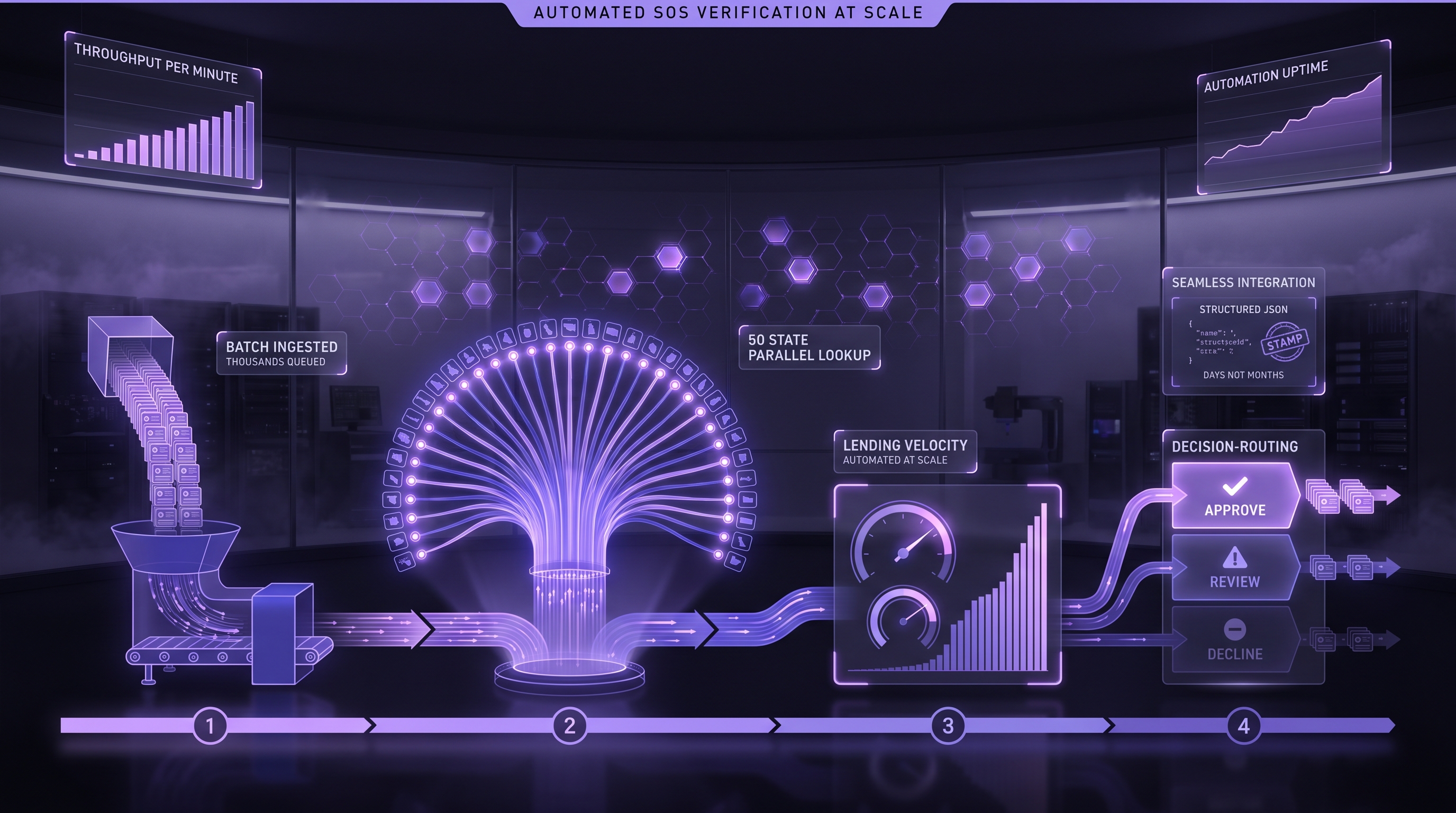
Executive Summary: A lender that receives thousands of business applications a month cannot have analysts search state registries one at a time. Replacing them with one live API call per typed name does not work either: it attaches the wrong entity when the applicant typed a trade name, and it lets the slowest state set the pace for the whole queue. Automating Secretary of State (SOS) verification at volume is a routing problem, and this guide lays out the five-stage pipeline that solves it.
Disclosure: Cobalt Intelligence publishes this guide and sells the SOS API it describes. Product statements come from Cobalt's public API documentation; the regulatory and engineering references stand on their own.
Why Does Secretary of State Verification Break at Thousands of Applications a Month?
What does each state registry actually give a lender?
Every state runs its own business-entity registry with its own search page, status vocabulary and record layout. A person can work through those sites for a few files a day. At thousands of files, manual lookup becomes the queue, and the obvious workaround of scripting each state's website runs into the states' own rules. Delaware's entity search page is direct about it:
"The Division of Corporations strictly prohibits mining data. Excessive and repeated searches that may have a negative impact on our systems and customer experience are also prohibited. Use of automated tools in any form may result in the suspension of your access to utilize this service."
That notice appears on the Division of Corporations' public name search.[1] A homegrown scraper is therefore not only a maintenance project. In at least one major formation state it conflicts with the terms of the registry it depends on.
Why do new applicants make the problem harder?
The U.S. Census Bureau counted 531,728 seasonally adjusted business applications in August 2026. Those are applications for an Employer Identification Number on IRS Form SS-4, not Secretary of State registrations, so they measure new-business activity rather than new state records.[2] For a lender, the relevant point is timing. A new business can reach a lender before its registry record is easy to find, and Cobalt's own documentation says a business may not appear in its database because it is "very newly registered."[3] A pipeline that treats "not found" as "does not exist" will turn some real applicants away.
What Goes Wrong When Automation Means One Live Search per Typed Name?
The simplest automation sends whatever the applicant typed to a live registry search and accepts the top result. It fails in three predictable places.
Why is the typed name the weakest input in the file?
A business can operate under a name that is not its registered legal name. The IRS asks for the legal name of the entity on line 1 of Form SS-4 and the trade name on a separate line.[4] The Small Business Administration describes the legal name, a DBA, a trademark and a domain name as separate registrations that "are legally independent."[5] An applicant who types the trade name, an abbreviation or an old name gives the search an ambiguous input. If the pipeline takes the first plausible match, it can attach the file to a different entity, and every later check inherits that mistake. For the trade-name case specifically, see DBA vs Legal Entity: Resolve the Borrower Before Business Verification.
Why does the slowest state set the pace?
Live registry searches do not all return at the same speed. Cobalt's public API documentation states that some requests take longer than 30 seconds and return a retryId so the caller can check back for the result.[3] If an application form or an underwriting job waits synchronously on every live search, the slowest state in the day's mix determines how fast the whole queue moves.
Why do exceptions pile up?
A registry search can legitimately return no exact match, a set of close alternatives, or a message that the state is unavailable. Each is a normal outcome with a documented response shape.[3] A pipeline with no route for these cases drops them into an analyst's inbox, and at volume that inbox becomes the new bottleneck.
What Do the Usual Automation Approaches Leave Unsolved?
Which approaches do lenders typically compare?
High-volume lenders usually choose among four sources for SOS data:
• Analyst or offshore lookup teams. People search state sites and record results. This keeps judgment in the loop but scales only with headcount.
• In-house state integrations. Engineers build and maintain a connector or scraper per state, subject to each registry's terms, as Delaware's notice shows.[1]
• Multi-source KYB platforms. These generally bundle registry data with other identity checks behind one integration and one contract.
• Direct SOS data APIs. A provider such as Cobalt returns state registry records through one endpoint, and the lender assembles the surrounding checks and decisions.
How do the last two options differ in practice?
The difference is who owns the orchestration. A multi-source platform suits a team that wants fewer integrations and is comfortable with the vendor's packaging of several checks. A direct SOS data API suits a team that already runs its own KYB sequence and wants registry records it can route with its own rules. Cobalt's SOS Search can query the live registry ("search the registry in real time," in the documentation's words) or return a dated database record, and the lender chooses which per request.[3] A direct API is the wrong choice for a lender with low volume or no engineering capacity to build routing; analysts or a bundled platform will usually serve that lender better. Either way, the lender still makes the credit decision. Vendor selection in depth is covered in Top 8 Secretary of State API Solutions, the Cobalt vs Middesk SOS data comparison, and Business Entity Verification API for High Volume Lenders.
What does every approach still leave the lender to design?
Whichever source a lender picks, the same questions remain: how intake selects the right entity, when a stored result is fresh enough, what happens while a slow state is still working, where each exception goes, what is kept for audit, and what happens after funding. The data source answers none of these by itself. The rest of this guide treats them as stages of one pipeline and shows the Cobalt capability that serves each one, with its documented limits.
What Does a Five-Stage SOS Pipeline Look Like at Volume?
The pipeline separates decisions that a single live search collapses into one call. Each stage has a different job, speed and kind of certainty:
• Stage 1: Select. Turn the typed name into one chosen entity and state before any full search runs.
• Stage 2: Screen. Run a database lookup to flag files that show a disqualifying status, accepting that the result carries a date.
• Stage 3: Confirm. Run a live registry search for files that reach the point where current status matters, without blocking on slow states.
• Stage 4: Route exceptions. Give not-found, alternatives, state-unavailable and conflicting results their own paths.
• Stage 5: Watch. Re-check funded borrowers on a schedule so a status change after funding reaches the right queue.
• Throughout: Keep evidence. Store what each stage returned, when, and what the lender decided.
A hypothetical example shows why the stages matter. An applicant first types "Acme Pizza," the name on the storefront, and the selection list stays empty because it matches registered names, not trade names. The applicant shortens it to "Acme Hold," sees "ACME HOLDINGS LLC" with an Ohio address that matches the application, and picks it. Stage 2 finds a database record that shows an active status, so the file proceeds. At underwriting, Stage 3 sends a live search on that sosId with a callbackUrl. The response acknowledges the request at once, and the current record arrives at the callback whenever the registry returns it, so no screen waits on the state. Had the entity never appeared at Stage 1, the file would have gone to Stage 4's manual-entry route rather than to a decline.
What does each stage protect the lender from?
For a risk leader, each stage closes a specific loss path. Selection prevents underwriting and funding the wrong entity, the error every downstream check inherits. Screening and live confirmation prevent funding a business whose current status is dissolved, forfeited or delinquent; Entity Status Changes: From Active to Delinquent covers what those statuses mean for a loan. Exception routing prevents both false declines of real applicants and quiet approvals of files nobody resolved. Monitoring catches the status change that happens after the money is out. To find where your own queue leaks, pull a recent month of applications and count:
• Name mismatches. Files where the typed business name differs from the legal name on the registry record you relied on.
• Slow lookups. Files where a live search ran past 30 seconds and someone or something waited on it.
• Not-found results. Files that came back with no record, and what happened to each one.
• Unreviewed alternatives. Files where a close match was accepted without a recorded reason.
• Stale screens. Files decided on a stored result with no live read before funding.
• Post-funding changes. Funded borrowers whose registry status changed and how long it took you to learn about it.
Those six counts show which stage to build first.
How should intake select the entity before searching?
Selection is where Cobalt's Suggest (Typeahead) endpoint fits. As a user types a business name, GET /v1/search/suggest returns a short list of matching businesses with name, state, sosId and one address, "not the full record." The documented integration pattern is to start requesting after three characters, debounce keystrokes by about 150 milliseconds, and, when the user picks a suggestion, use its sosId with the state to run the full Secretary of State search.[3]
The limits matter as much as the feature. Suggest matches the start of words and requires every typed word to match. It has no typo tolerance and matches registered names only, not DBAs or trade names. It searches Cobalt's database, which the documentation describes as around 86 million businesses but "not every business in every state," so an empty list does not mean the business does not exist and the integration should let the user continue by typing the name manually.[3] A deeper treatment of the selection screen and what to retain from it is in Business Name Autocomplete for Lenders.
The two calls look like this:
# Stage 1: candidate selection as the applicant types (3+ characters)
curl -G 'https://apigateway.cobaltintelligence.com/v1/search/suggest' \
  -H 'x-api-key: YOUR_API_KEY' \
  --data-urlencode 'searchQuery=acme hold' \
  --data-urlencode 'state=OH'

# Stage 3: live record for the selected candidate, delivered to a callback
curl -G 'https://apigateway.cobaltintelligence.com/v1/search' \
  -H 'x-api-key: YOUR_API_KEY' \
  --data-urlencode 'sosId=SELECTED_SOS_ID' \
  --data-urlencode 'state=oh' \
  --data-urlencode 'liveData=true' \
  --data-urlencode 'screenshot=true' \
  --data-urlencode 'callbackUrl=https://your-app.example.com/webhooks/sos'
When is a database result enough, and when must the lookup go live?
SOS Search can run against Cobalt's database or against the live registry. With liveData=false, a lookup that finds nothing tells the caller to retry with live data to search the registry in real time, and database results carry createdAt and updatedAt timestamps.[3] That makes the trade-off explicit: a database result is a dated observation, and a live result is a current read of the registry that may take longer.
The lender decides where the line sits, and the asymmetry matters. A database hit that shows a disqualifying status, such as dissolved, is a reason to prioritize the file for a live search, not a final decline; the entity may have been reinstated since the record's updatedAt date. A database miss proves even less about the business, so it should route to a live search or to Stage 4, never to a decline. One workable rule is to require a live result before funding or before any decision that depends on current status. Write it down as a freshness policy: how old an updatedAt value can be for each decision type, and which decisions always require a live read. For the dependency order of the wider pre-screening sequence, see How to Design a Dependency-Aware Pre-Screening Waterfall.
How Should the Pipeline Handle Slow States and State Outages?
Should live calls be synchronous or asynchronous?
The answer depends on who is waiting. A background job can poll: when a live search runs longer than 30 seconds, the response returns status Incomplete, HTTP 202 and a retryId, and the caller checks back with that ID. An applicant-facing form should not wait on a registry at all. With a callbackUrl, the first response confirms that the completed request will be sent to the callback, and the result arrives when the state returns it.[3] A workable design uses both: callbacks for the application flow and polling for batch jobs that already run in the background.
How should the pipeline fan out thousands of live searches?
Throughput at volume comes from not waiting, not from faster single calls. Send live searches with a callbackUrl, store each request against the application it belongs to, and let results land as states return them; callback responses carry a requestId that ties the delivered result back to the request. Keep polling with retryId for background jobs, and cap the number of outstanding requests per state on your own side so one slow state cannot absorb all of your workers. On rate limits, be precise: the public documentation shows a trial-limit error and a Business Monitoring cap of 500 businesses per state, but it does not publish a general request-rate limit for SOS Search.[3] Confirm production limits with Cobalt before sizing a launch, and do the same with any provider.
What keeps callback delivery reliable at volume?
At thousands of lookups, delivery failures stop being rare, so three habits matter. Make handlers idempotent: Stripe's webhook documentation warns that endpoints "might occasionally receive the same event more than once,"[6] and a repeat SOS callback must never create a second decision. Send callbacks the handler cannot process to a dead-letter queue, which Amazon SQS describes as a target for messages "that are not processed successfully."[7] And retry with exponential backoff and jitter so retries do not pile onto a state that is already slow.[8]
What happens when a state's registry is down?
Risk teams should ask this of any SOS source, and the response shapes answer it. Cobalt's documentation shows that when a live lookup fails, or the state is down for maintenance, and recent data exists, the response returns those recent results with a message saying so, for example "This state is currently down for maintenance. However, We do have recent results."[3] The pipeline should label that result as not live, apply the freshness policy to it, and queue a live retry before any decision that requires a current read.
How Should Each Exception Get Its Own Route?
What does a not-found or an empty suggestion list mean?
It means the search did not find a record, not that the business does not exist. The Suggest documentation says this directly for its database, and a registry search can miss a very new filing, a name variant, or an entity registered in a different state than the applicant listed. Route not-found files to a defined sequence: manual name entry, a search by entity ID if the applicant can supply one, and, when the state of registration is uncertain, Cobalt's Full Verification request, which sends a search to all available states and returns a searchGuid for tracking.[3] The finite-state design for these outcomes is covered in How to Turn No-Match Results Into Finite-State Workflows.
How should close alternatives and conflicts be handled?
When no exact name match exists, the response can return close alternative results instead. Those are candidates, not answers. Present them to a reviewer with the submitted name, the state and the address, and record which one was chosen and why. Results also carry a confidenceLevel field; the lender should set its own thresholds for automatic acceptance and review rather than treat any single score as a decision.[3]
What Evidence Should a High-Volume SOS Pipeline Keep?
What should be stored for each lookup?
A screenshot pasted into a CRM is not an audit trail. For each lookup, keep the submitted name, the selected candidate and who or what selected it, the request parameters, whether the result was live or from the database with its updatedAt value, the full response, the requestId for callback deliveries, and the lender's resulting decision. When screenshot=true is set, the response includes a screenshotUrl; download the image into the lender's own system of record rather than relying on the link.[3]
How does officer data relate to beneficial ownership?
State registry records show the officers, directors and registered agents that the state collects, and what a state collects varies. Those names support review of the people associated with an entity. They are not, by themselves, a beneficial ownership verification. Under the federal Customer Due Diligence rule, covered financial institutions must identify and verify beneficial owners of legal entity customers, defined as each individual who owns 25 percent or more of the equity plus a single individual with significant control, such as an executive officer.[9] An officer list from a registry does not establish ownership percentages. Whether that rule applies to a particular lender depends on whether it is a covered financial institution; the lender's own KYB policy may require the same information either way.
How do UCC filings fit the same pipeline?
SOS Search can attach Uniform Commercial Code filing data to a result with uccData=true, and Cobalt's separate UCC Search endpoint returns up to 30 filings with a count of the total found.[3] A UCC-1 financing statement is sufficient only if it provides the name of the debtor, the name of the secured party and an indication of the collateral,[10] and Article 9 directs those statements to a designated filing office.[11] For an MCA or working-capital lender, an existing secured party is a signal to review, not a conclusion. What counts as stacking, and what happens next, is the lender's rule. See How UCC Data Reveals Loan Stacking in MCA Portfolios for that review.
What Happens After Funding, and How Does Monitoring Fit?
How does Business Monitoring re-check a funded portfolio?
A record that was active at onboarding can change. Cobalt's Business Monitoring enrolls a business with a checkFrequency between 1 and 30 days and an optional end date, and delivers each check to the lender's callback URL. The first check is a baseline; later checks report a changes array in which each change carries a severity of critical, major or minor and a category such as status, agent, name, address, contact, compliance or identifiers. A not-found check is still a delivered check, and a business that first appears in, or drops off, the registry is reported as a single critical change.[3] Those categories describe the Secretary of State record; TIN, sanctions, UCC and court checks need their own processes. Setup is covered step by step in How to Set Up Business Monitoring for a Loan Portfolio, and the change model in Business Monitoring: Automated Secretary of State Change Detection for Lenders.
When does a one-time portfolio sweep make more sense?
Monitoring watches enrolled borrowers going forward. A lender that has never re-verified an existing book, or is migrating from another provider, may first need a one-time sweep of every active borrower; that design is covered in How to Bulk-Verify Business Registration Status Across a Portfolio. The sweep's output then decides which borrowers to monitor and how often.
Where does Cobalt fit, and what stays with the lender?
Cobalt supplies the lookup modes that the five stages route between, through one API key: Suggest for selection, SOS Search in database or live mode with retryId and callbacks, UCC data, Full Verification when the state is unknown, and Business Monitoring after funding.[3] It is a data source. It does not approve a file, decide what a status means for credit, or by itself identify fraud or establish compliance. The lender owns the selection rules, the freshness policy, the exception routes and every credit decision.
A practical next step is to run the six counts above on a recent month of applications, which shows where your queue loses time and money. To test the stages against Cobalt's API, start with the Cobalt API documentation or book a demo.





.jpg)


.png)